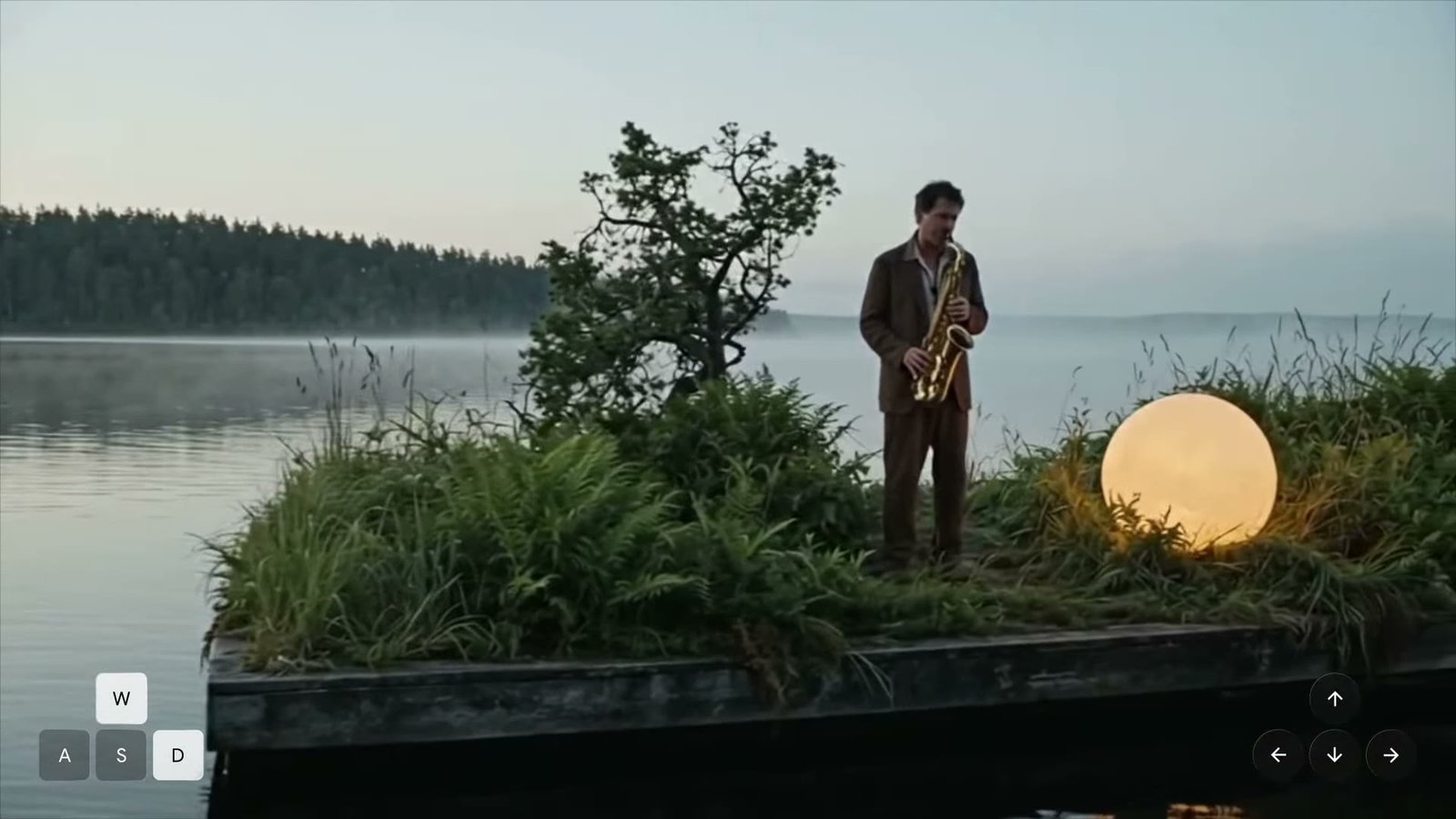
What is Genie 4?
Genie 4 is an AI world model from Google DeepMind. It creates a running simulation that responds to actions and instructions. You can move through a scene and change what happens while it is being generated.
A video has a sequence you watch. A world model gives you an environment to interact with. Imagine a lake: you could move toward the shore, change the weather, or introduce a person into the scene, then see how the simulation responds.
Genie 4 combines world generation with capabilities from the Gemini family. Google describes Gemini as helping interpret instructions and maintain the scene’s continuity.
What’s new in Genie 4?
- Live direction
- Use natural language to change the weather, move the camera, or introduce a person or object. Instructions are interpreted in the context of the running scene.
- Native sound
- Worlds can include ambient audio, music, and interactive dialogue. Characters can respond to instructions or events as they happen.
- Movement and physics
- Google’s demos show improvements in visual realism, physical interactions, and the way people move and react to their surroundings.
- Interactive exploration
- In the published demonstrations, people use keyboard controls to navigate and text to steer events. The environment continues between instructions.
These capabilities are described in the official launch announcement. Genie 4 remains experimental.
What the demos look like
Frames from Google DeepMind’s published videos. Open either image to see the full-size screenshot.


Demo imagery © Google DeepMind. View the original demonstrations ↗
How to use Genie 4
Access is limited at launch. The steps below are a suggested starting workflow for when you receive access; the final product interface and controls may change.
Join the official waitlist
Register your interest through Google’s Genie 4 waitlist. The preview begins with trusted testers, with Google AI Ultra and early developer access planned next.
Describe a focused scene
Choose a setting, one main subject, a visual style, and a soundscape. A simple scene makes it easier to understand how the model responds.
Explore before making edits
Use the controls shown in the product to navigate. In the official demos, users explore with a keyboard and change the scene with text instructions.
Change one thing at a time
Try moving the camera, introducing rain, or adding a new event. Observe the result before adding another instruction. Restart with a simpler scene if details drift.
Three prompts to start with
These original examples illustrate a useful structure: place, subject, atmosphere, sound, and one clear direction. They have not been tested in Genie 4.
A place to explore
A coastal village at sunrise. Small fishing boats rock in the harbor. Walk slowly along the stone pier, with gulls overhead and gentle waves below.
Follow-up: “Bring a light rain into the scene.”
A different visual style
A miniature city built from paper. A red tram travels between folded buildings. Follow it from street level as the paper leaves rustle.
Follow-up: “Move the camera above the rooftops.”
A character and an event
A greenhouse in soft afternoon light. A gardener tends rows of herbs. Hear water trickling and leaves moving in the breeze.
Follow-up: “The gardener notices a bird at the window.”
What could it be used for?
Creative planning. Explore a scene’s atmosphere, camera positions, action, and sound before committing to a shoot or a larger production.
Experience prototypes. Try the visual direction and feel of moving through an environment before building a complete game or interactive project.
Research and learning. Investigate simulated scenarios and environments for agents. Generated events need independent validation; they are not reliable evidence or predictions.
Genie 3 and Genie 4
Both models generate interactive environments. Genie 4’s announcement emphasizes audio, scene direction, and improvements in realism.
| Feature | Genie 3 | Genie 4 |
|---|---|---|
| Exploration | Real-time interactive worlds | Interactive worlds with improved realism |
| Audio | Not highlighted at launch | Native audio and responsive dialogue |
| Scene changes | Promptable world events | Natural-language steering with Gemini |
| Launch access | Limited research preview | Trusted testers; wider access planned |
Sources: Google’s Genie 3 and Genie 4 launch posts. Genie 3 specifications should not be assumed to apply to Genie 4.
Access, availability, and pricing
At launch: Genie 4 is rolling out as a research preview to trusted testers.
Planned next: Google AI Ultra subscribers through Project Genie, and early access partners through the Gemini API and Google AI Studio.
Pricing: The announcement does not publish a standalone Genie 4 price, free access tier, or a date for general availability. An Ultra subscription should not be treated as a guarantee of immediate access.
Access information checked on 27 October 2026.
What are the limitations?
Visual details and object permanence can drift, particularly in longer sessions or after complex edits. Physics, spatial accuracy, audio precision, readable text, and long-term consistency remain research challenges.
Genie 4 is an experimental simulation, rather than a finished game engine. The announcement does not establish editable game-engine assets, multiplayer, or downloadable 3D projects.
Google describes a staged rollout, safety evaluations, and SynthID watermarking for generated video and audio. Treat scenes as material for exploration and ideation, not proof of real events.
Questions and answers
What is Genie 4?
Genie 4 is Google DeepMind’s new AI world model, announced on October 27, 2026. It generates an interactive environment that responds as you explore and change it.
Can I use Genie 4 right now?
The launch begins with a research preview for trusted testers. Google says access is coming to Google AI Ultra subscribers through Project Genie and to early access partners through the Gemini API and Google AI Studio. Use the official waitlist to register your interest.
Is Genie 4 free?
The launch announcement does not publish a standalone Genie 4 price or a free access tier. Planned consumer access starts with Google AI Ultra subscribers. Check Google’s current terms before subscribing; a subscription alone should not be treated as a guarantee of immediate Genie 4 access.
Is there a Genie 4 app to download?
The announcement describes access through Google’s products and a research preview. It does not announce a standalone Genie 4 download. Follow the official links on this page for access information.
Can developers use the Genie 4 API?
Google has announced an upcoming early access route for partners through the Gemini API and Google AI Studio. The launch post does not establish general API availability, public endpoints, or API pricing.
Is this a finished game engine?
Genie 4 is an experimental world model. An explorable generated scene should not be assumed to include production game systems, editable game-engine assets, multiplayer, or a downloadable 3D project.
What resolution and frame rate does Genie 4 support?
The launch announcement does not specify a universal Genie 4 resolution, frame rate, or session length. Genie 3’s published specifications should not be presented as Genie 4 specifications.
Is genie4.net an official Google website?
No. This is an independent educational guide. Genie, Gemini, Project Genie, and Google DeepMind belong to their respective owners. Access requests go directly to Google’s official waitlist.
Official sources
- Genie 4: A new generation of world simulation ↗Google DeepMind · 27 October 2026
- The official Genie 4 launch film ↗Google DeepMind · YouTube
- How to create effective prompts with Genie ↗Google DeepMind · General Genie guidance